Have you ever wondered if you could build a functional application without spending weeks on coding? Last weekend, I decided to build a Vibe Coding web app from scratch. Inspired by the “Vibe Coding” movement popularized by tech YouTubers like Jocoding, I set out to create a tool called “PDF MultiTools” in a single afternoon.
What is Vibe Coding?
The term Vibe Coding refers to a new paradigm of software development where the creator focuses on the “vibe” or the high-level intent, letting AI models like GPT handle the intricate syntax and logic. It’s not just about no-code; it’s about high-level orchestration. In this guide, I’ll show you how to leverage this trend to deploy your first Vibe Coding web app faster than ever before.
Step 1: UI Ideation with Google Stitch
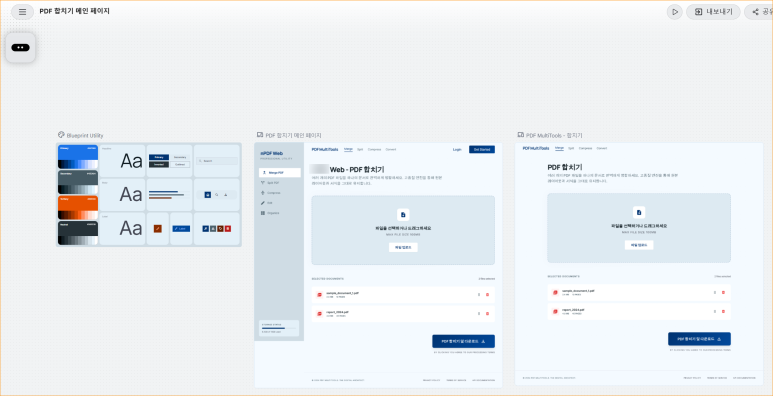
For any Vibe Coding web app, the first impression is the UI. Since I’m not a designer, I used Google Stitch. It allows you to generate professional layouts using simple text prompts.
I provided a prompt for a “PDF Management Tool” with a clean header and a drag-and-drop zone. Within seconds, Stitch gave me a modern interface. I refined it by removing unnecessary sidebars and tweaking the title to “PDF MultiTools.” This visual-first approach is the core of a successful Vibe Coding web app workflow.
Step 2: Implementing Logic with GPT-5
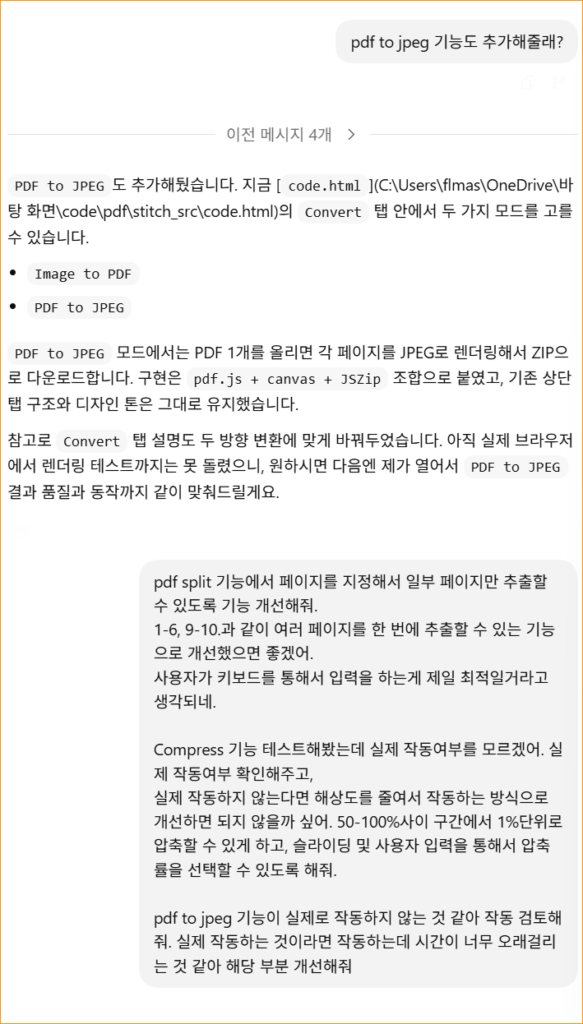
With the design exported, it was time to add the “brain.” I used GPT-5 to write the JavaScript for merging PDFs.
One thing I learned while building this Vibe Coding web app is that model choice matters. While “mini” models are fast, the full-scale GPT-5 model was much better at preserving my original HTML structure from Stitch while injecting complex logic. I also made sure to keep this as a client-side static web app. This means user files are processed locally in the browser, providing top-tier privacy and speed—a huge plus for any modern web tool.
Step 3: Globalization and Legal Readiness
To make this Vibe Coding web app ready for a global audience, I didn’t stop at the English UI. I asked the AI to:
- Ensure all buttons and instructions were clear for international users.
- Generate a comprehensive “Privacy Policy” and “About Us” page. This is a critical step if you plan to monetize your app with Google AdSense later on. Having these pages increases your site’s authority in the eyes of search engines.
Step 4: Seamless Deployment via Hostinger
Finally, I deployed the project on Hostinger. Since it’s a static site, the process was incredibly simple. Instead of setting up complex CI/CD pipelines, I used the Hostinger File Manager to upload my build folder.
Pro Tip: If you encounter issues with .zip extraction on your host, simply upload the unzipped folders directly. It’s a small workaround that saved me a lot of time during the final deployment phase of my Vibe Coding web app.
Conclusion: Why You Should Start Today
Building the PDF MultiTools was a revelation. It proved that with the right AI tools, the gap between “idea” and “published app” has shrunk to just a few hours. If you’ve been hesitating to start your coding journey, remember that you don’t need to be a senior engineer. You just need to master the art of the “vibe.”
What kind of Vibe Coding web app are you planning to build? Let me know in the comments below, and let’s discuss how AI is changing the world of 1-person startups!
Challenges and Solutions During Development
Building a Vibe Coding web app isn’t always a walk in the park. One challenge I faced was ensuring the PDF merging library (PDF-lib) worked seamlessly within the static environment. I had to consult the official PDF-lib documentation to debug a specific issue regarding font embedding.
Additionally, while Google Stitch provides incredible UI foundations, manual CSS tweaks were necessary to make the upload box truly responsive on mobile devices. If you’re interested in more AI development tips, I highly recommend checking out Jocoding’s YouTube Channel, which was the original inspiration for this project.